Find the intended document.
Potential friction. An unfamiliar security tool adds cognitive effort before the file task.
Design response. Use recognizable metadata and a consistent table structure.
SECURITY · WORKFLOW DESIGN
Making encrypted document access understandable through a familiar workspace, clear actions, and contextual guidance.
A recipient-facing document-sharing workflow within my broader role leading design and frontend delivery at Confidencial.io.
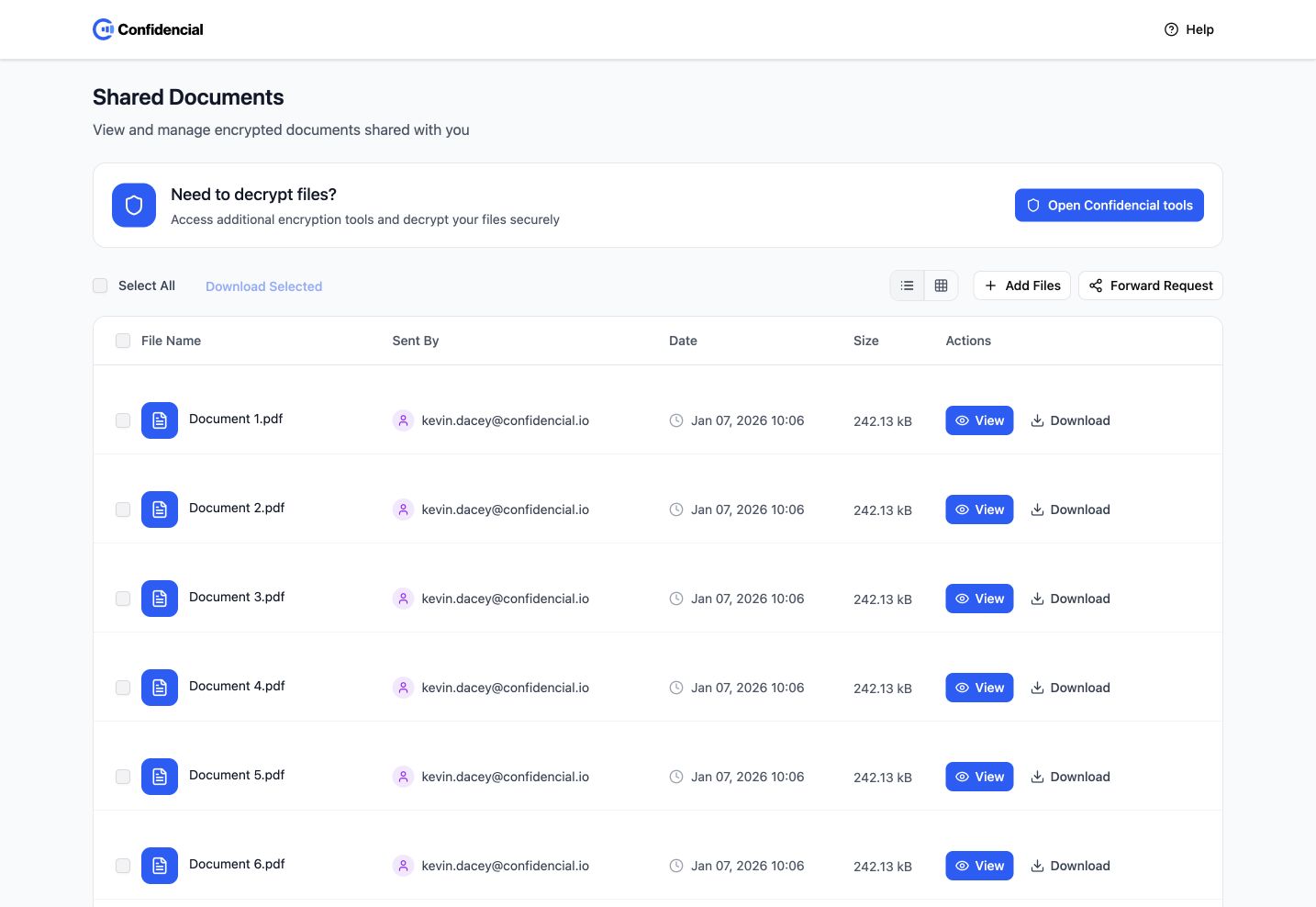
A recipient needs a document, but first has to understand an unfamiliar protected-file workflow.
Use familiar file metadata and clear actions to help recipients choose the right document and understand what happens next.
The working hypothesis is that familiar file-management patterns, paired with concise explanations at the point of action, can reduce avoidable uncertainty. This is a hypothesis to validate; no support-volume reduction or completion-rate improvement is claimed.
MY CONTRIBUTION
These responsibilities describe my 2025 Confidencial.io role. This case uses the supplied recipient-facing prototype to explain one workflow. Role-level implementation and efficiency results do not establish that this specific prototype was deployed or that its security behaviour was verified.
The prototype demonstrates the recipient interface. The interaction review covers selection and preview; it does not verify encryption, a production rollout, or a reduction in support requests.
Recipient journey reconstructed from the prototype. The friction statements are design hypotheses, not reported research findings.
| Who the experience serves | What they need |
|---|---|
| External recipient | Identify the intended file, understand its origin, and choose the appropriate way to open it. |
| Repeat recipient | Work through several documents efficiently without repeating basic guidance. |
| Sender or support team | Help recipients complete the exchange without repeated manual explanations. |
Potential friction. An unfamiliar security tool adds cognitive effort before the file task.
Design response. Use recognizable metadata and a consistent table structure.
Potential friction. View, Download, and opening another tool can imply different outcomes.
Design response. Keep action labels and document context together.
Potential friction. Repeated guidance and unclear selection slow familiar tasks.
Design response. Make the tour optional and expose selection-dependent batch actions.
A recipient needs to identify a shared file, understand its access options, and continue through a set of documents.
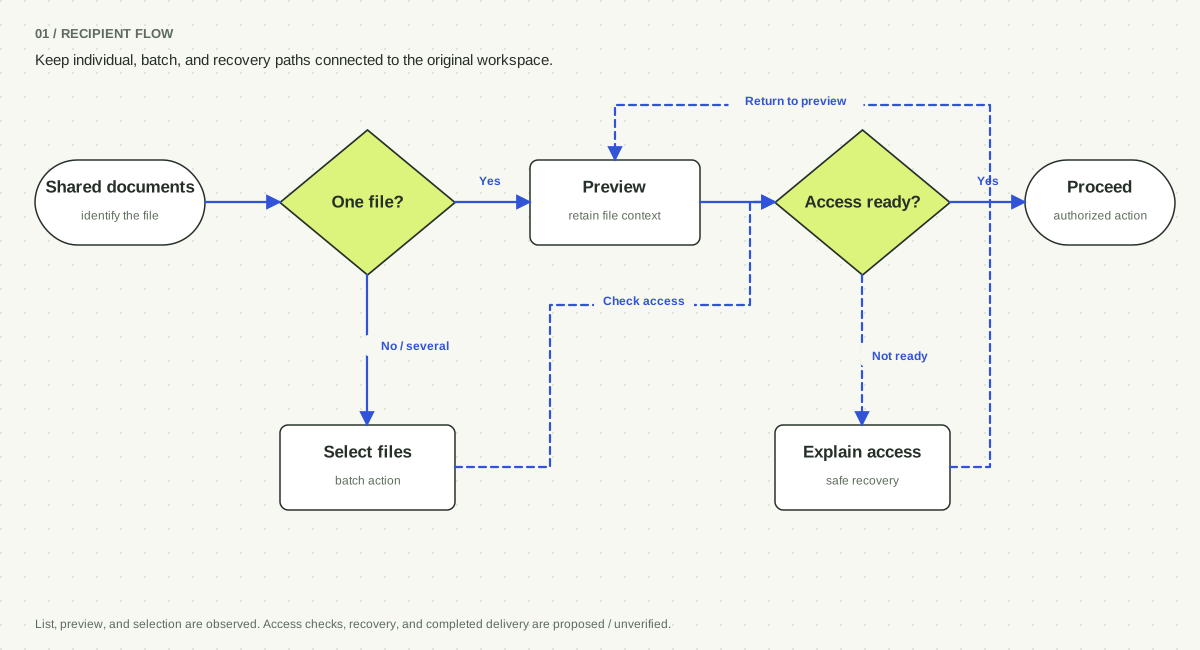
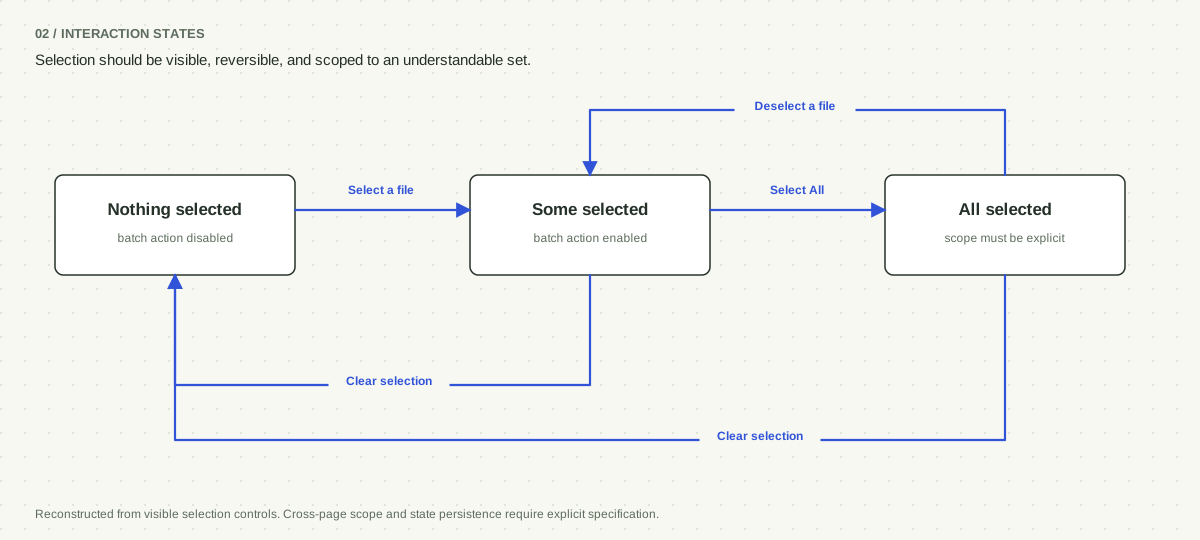
Select individual files or Select All, then use the enabled batch action. Selection controls are observed; cross-page scope needs specification.
Explain unavailable or unauthorized access and provide a safe route back. These failure screens are proposed, not demonstrated in the source.
Solid path: interactions observed in the prototype. Dashed branches: requirements proposed for completion. Actual decryption and delivery were not verified.
Explore the key screens, interaction states, and decisions behind them.
INTERACTION EVIDENCE / SELECTION STATES
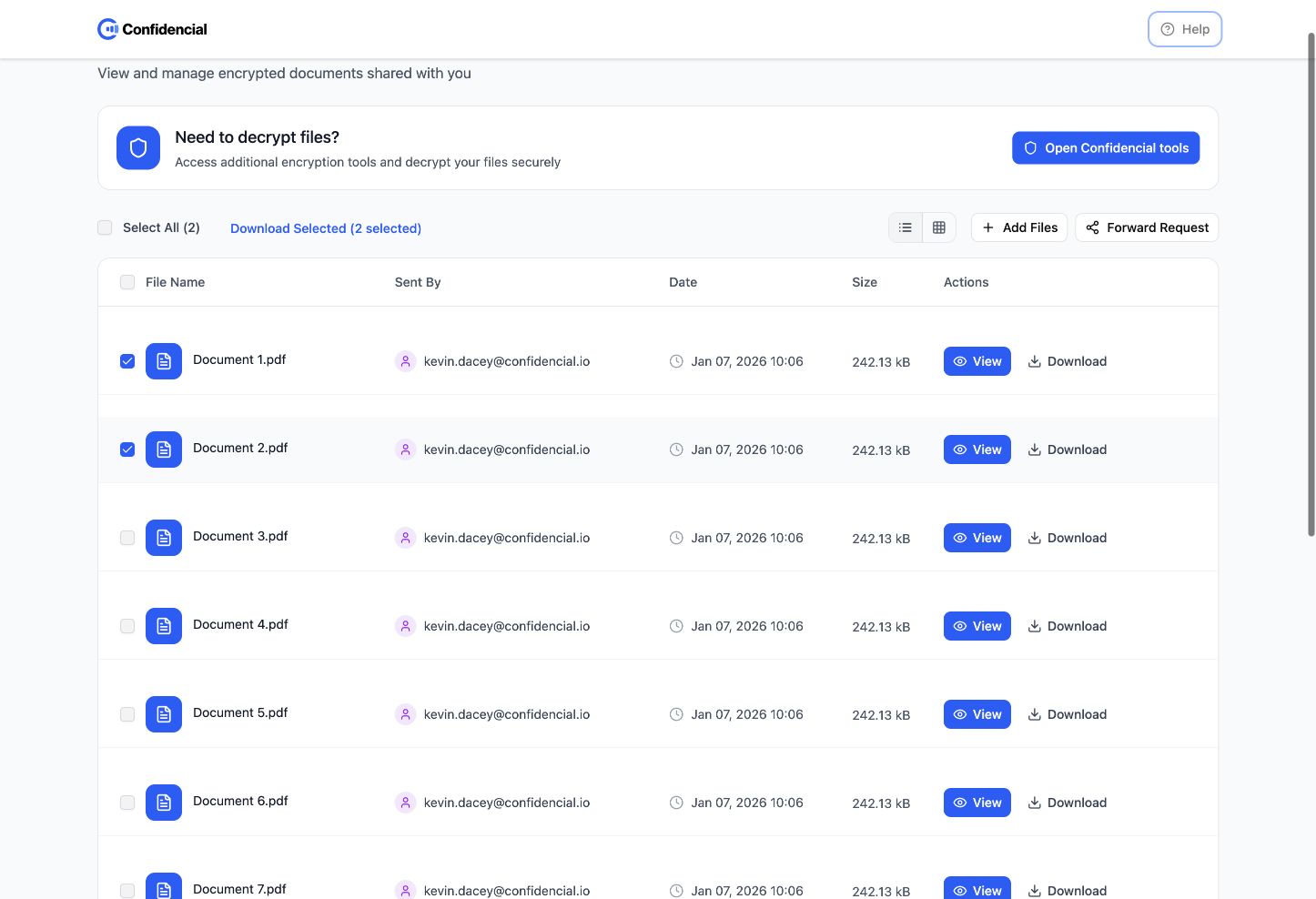
With no files selected, Download Selected is disabled. Selecting two files enables the action and adds “2 selected.” The state change connects intent to scope before a batch operation.
Batch actions save repetition, but add selection state to an otherwise simple task. Individual View actions remain available without selecting the row.
Observed in the supplied prototype. This is a state comparison, not a claim that download delivery or cryptographic behavior was tested.
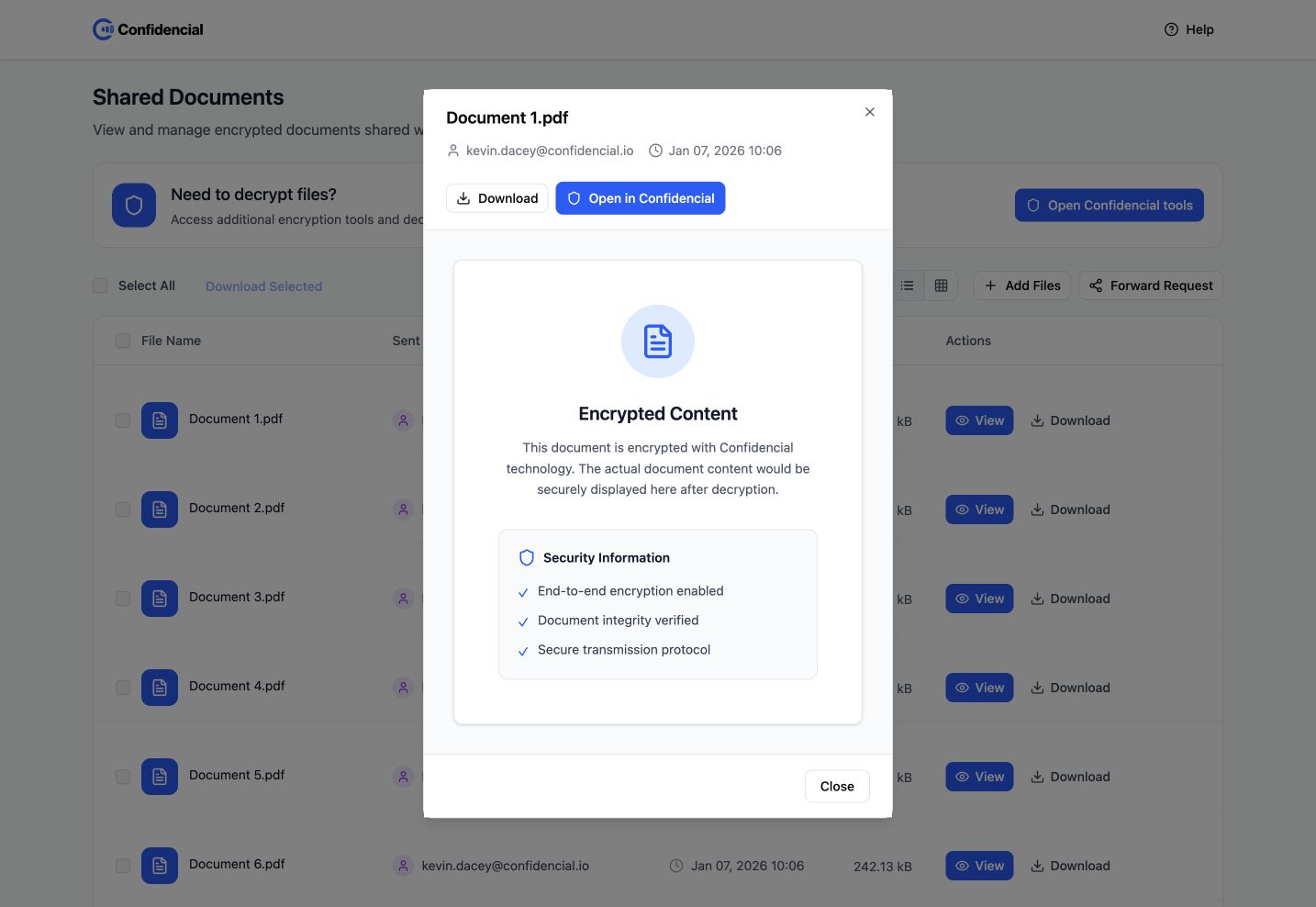
The dialog carries the file name and sender context into the decision.
The content is a placeholder. Production copy must reflect the real access and decryption state.
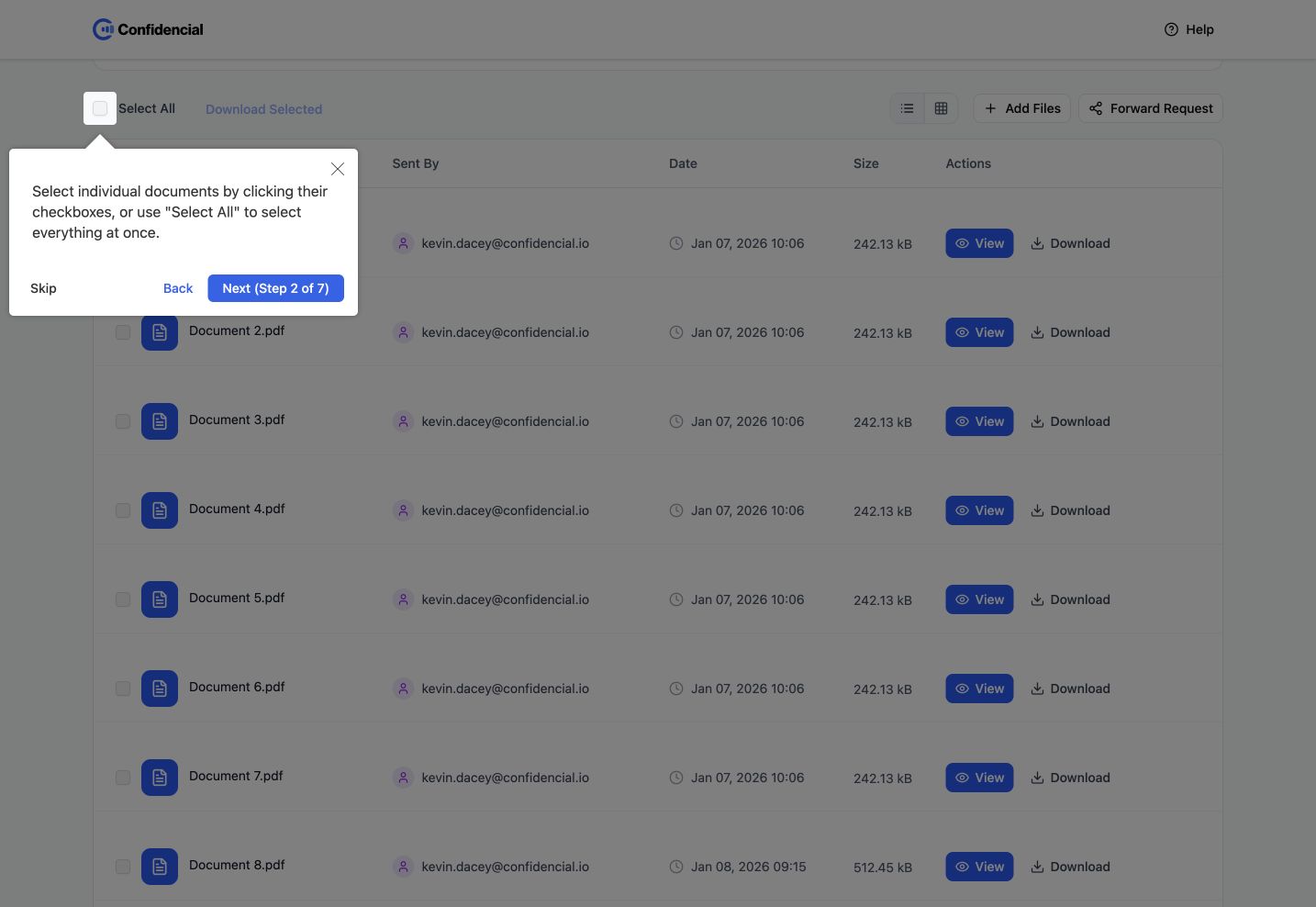
The tour points to selection controls in the workspace itself.
Skip and Close let recipients return to the task without finishing the tour.
Design evidence, the reasoning it supports, and the tradeoffs that remain.
In the design. The prototype lists file name, sender, date, size, and per-file View and Download actions.
A table supports recognition and comparison. It allows the recipient to establish which item matters before learning a specialist workflow. Sender and date also provide useful context without requiring a separate detail page.
Dense tables suit desktop scanning but require a deliberate compact layout on smaller screens. Sender metadata is context, not independent proof of authenticity.
In the design. View opens a dialog with document metadata, an encrypted-content state, Download, and Open in Confidencial.
The rationale is to keep inspection distinct from downloading and opening another tool. A recipient can understand what happens next while retaining a route back to the original list.
Multiple actions can introduce ambiguity. Their labels and descriptions must accurately reflect implemented behavior, especially when decryption is required.
In the design. A seven-step tour can be skipped or closed. The workspace also includes help, selection controls, and a disabled batch action before selection.
A first-time user benefits from orientation; a repeat user needs efficiency. Optional guidance and state-dependent actions let the same surface support both without forcing everyone through the same explanation.
A tour cannot compensate for unclear labels. The core task must still make sense when the tour is skipped or forgotten.
Retrospective option analysis; these are tradeoffs for review, not claims that every option was tested.
Value. Directs recipients to one controlled environment.
Tradeoff. Introduces setup and unfamiliarity before recipients understand their files.
Value. Provides a very small set of decisions.
Tradeoff. Moves the explanation of encrypted content outside the document workspace.
Value. Keeps orientation, inspection, and next steps together.
Tradeoff. Requires precise action labels and truthful security-state messaging.
A proposed study should ask first-time recipients to locate a particular file, inspect it, select several documents, and recover from an access problem. Observe hesitation and incorrect expectations as well as task completion. Do not use real confidential files for prototype testing.
Proposed task-based scenarios for validation.
| Scenario | What to observe | How the result informs design |
|---|---|---|
| Find and inspect a specified document with the tour skipped. | Correct file identification and expectations of what View will do. | Revise labels and hierarchy if guidance is required for the basic task. |
| Select multiple files, then move to another page. | Whether selection scope and remaining selections are understood. | Specify visible-page versus all-page behavior before implementation. |
| Attempt to open a file that is unavailable. | Understanding of the problem and ability to return without losing context. | Design an explicit recovery state rather than a generic failure message. |
Recipients reaching the intended authorized document action ÷ recipients attempting the task.
Connects usability with completion of the business exchange.
Participants correctly explaining View, Download, and Open in Confidencial before activating them.
Identifies confusing labels before they lead to unexpected behavior.
Task attempts requiring assistance, segmented by first-time and returning recipients.
Tests whether guidance supports the experience or compensates for it.
The working prototype demonstrates file organisation, optional guidance, batch selection, and document preview. In my wider Confidencial.io role, the design system and engineering workflow reduced frontend rework by approximately 60% and automated roughly 53% of design-to-code work. Those are role-level results, not measured recipient outcomes for this prototype.
Security UX earns trust through predictable behavior and understandable choices. The interface should make the next action clear without making claims that the underlying system has not verified.
Work covered. Design-function leadership, design system, and frontend engineering · 2025 contract. These are role dates, not measurement windows.
Reported measures. Approximately 60% less frontend rework and roughly 53% of the design-to-code process automated through Figma Make, Storybook, React design tokens, and AI-assisted handoff.
How to interpret them. These are role-level results for the design system and engineering workflow. They are not recipient conversion, security, or task-completion results for the document-sharing prototype. Baselines and measurement windows are not supplied in the résumé.
Source: my résumé ↗The prototype demonstrates the recipient interface. The interaction review covers selection and preview; it does not verify encryption, a production rollout, or a reduction in support requests.